






21st century technology
Fully supported by Microsoft Certified Professionals

 New Features
 Demo
Demo
 Free Downloads
Free Upgrades
 FAQ
FAQ
Help online
 Testimonials

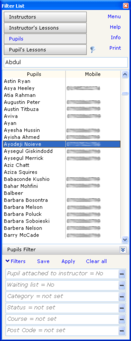 Filter is a very powerful and useful tool that allows you to drill down to the information that you need at this moment.
The filter list deals with four categories of data.
Filter is a very powerful and useful tool that allows you to drill down to the information that you need at this moment.
The filter list deals with four categories of data.
You can find the available filters at the bottom of the list and set them on the fly, saving them for later use.
The filter also includes an incremental find feature that allows you to quickly locate a name just by typing the first few characters.
The list displays only the name and a mobile phone number. To see more information for the selected pupil click right mouse button. The list can be printed or exported to MS Word and Excel


